
Invoicing
Invoicing software that sends, gets paid and posts itself
fiscal50 invoices are built in a live template editor: choose the customer, add product or service lines, and the sales tax fills in from your Sales Tax Setup for that item in the customer's state. An invoice can be Normal, Recurring (generated on a schedule, with optional approval) or Deferred Income (revenue spread over 1 to 60 accounting months), and a Normal invoice can be a retainer billed in advance. When you save, fiscal50 debits Accounts Receivable and credits revenue and sales tax payable, and it can email the customer a Pay Invoice Now button and a no-login invoice page. Payments are recorded against one or several invoices, with partial payments, overpayments kept as customer credit, discounts and tax withheld.
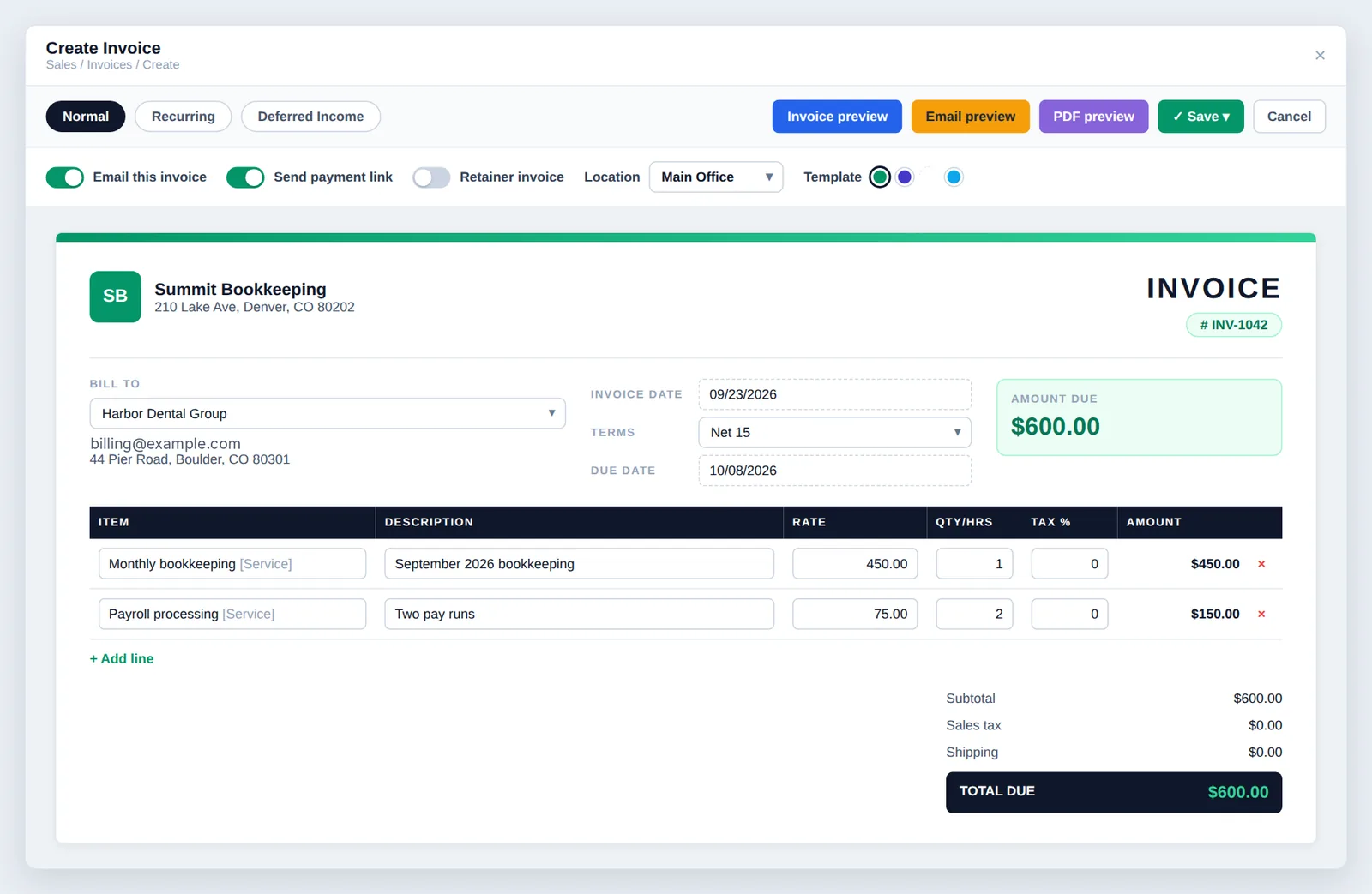
See it work
Create, send, get paid
Saving an invoice posts the receivable. Once Stripe is set up, the e-mail carries a Pay Invoice Now button for card or US bank account, and a no-login invoice page.
Invoicing
What invoicing in fiscal50 does for you
Build invoices from live templates with automatic sales tax, recurring schedules, deferred income and retainers, and send them by email with a Pay Invoice Now button, a hosted invoice page and a PDF.
Live invoice templates
Choose Classic Emerald, Indigo Night, Golden Ledger or Pearl Minimal; Golden Ledger and Pearl Minimal each offer four colors. The template and color are saved with the invoice and used in the editor, email, hosted page, PDF and previews.
Automatic sales tax
When you pick an item or change the customer, fiscal50 looks up your Sales Tax Setup for that product in the customer's state and fills in the Tax % on the line. You can override it on any line.
Recurring invoices with optional approval
A Recurring invoice generates invoices on a Daily, Weekly, Monthly or Yearly schedule, up to 500 invoices. With Approval Required, each generated invoice waits for your review in Alerts and transactions.
Deferred income
A Deferred Income invoice posts now and spreads the income evenly across 1 to 60 accounting months, recognized at the start, mid or end of each month.
Retainer invoices
Switch on Retainer invoice to bill a client in advance. The invoice gets one locked line with your Retainer service and posts to your retainer liability account instead of income.
Pay Invoice Now and a hosted invoice page
Once Online Payments Setup is complete (Stripe status Active and the Stripe accounts mapped), Send payment link adds a Pay Invoice Now button to the email (card or US bank account). View Invoice opens a no-login page that shows the latest version and paid status, and marks the invoice Viewed.
Flexible customer payments
Record one payment against several invoices as one deposit, take partial payments, keep overpayments as customer credit, and apply discounts or tax withheld.
Every invoice in one list
View All Invoices filters by status and date, searches with an exact-match option, exports to Excel, and offers edit, delete, receive payment, reminders, PDF download, replicate, refunds, returns and attachments per row.
How it works
How it works in fiscal50
Open Create Invoice and pick a template
Click Sales, then Invoices, then Create Invoice. Hover a thumbnail in the template gallery to preview it, then click it (or Use this template) to open the editor in that design.
Choose the invoice type
Normal is a one-time invoice. Recurring generates invoices on a schedule, and Deferred Income spreads the income over the accounting months you choose. Recurring and Deferred Income accept services only.
Choose the customer, dates and number
Under Bill To choose the customer; their billing address, email and saved terms fill in. The invoice date defaults to today, the terms calculate the due date, and the suggested invoice number can be changed if it stays unique.
Add line items
Click + Add Line and pick an item from your catalog, grouped by category and tagged Product or Service. Rate, description and quantity prefill, and the Tax % fills in from Sales Tax Setup for the customer's state.
Choose delivery, preview and save
Turn on Email this invoice on save and, once Online Payments Setup is complete, Send payment link. Check the Invoice, Email and PDF previews, then Save, Save & Receive Payment or Save & New.
In your books
What it posts
Saving an invoice books the receivable. Cash moves only when the payment is recorded.
Example amounts.
| Account | Debit | Credit |
|---|---|---|
| Accounts Receivable | 1,080.00 | |
| Revenue | 1,000.00 | |
| Sales Tax Payable | 80.00 | |
| Total | 1,080.00 | 1,080.00 |
| Account | Debit | Credit |
|---|---|---|
| Bank | 10.00 | |
| Sales Discounts | 10.00 | |
| Accounts Receivable | 20.00 | |
| Total | 20.00 | 20.00 |
A retainer invoice credits your retainer liability account instead of income. A Deferred Income invoice spreads the revenue across the months you choose.
How do I record deferred revenue on an invoice?
Use the Deferred Income invoice type on Create Invoice. The invoice posts normally and the income is spread evenly across the accounting months you choose — 1 to 60, limited by your open periods — recognized at the start, mid or end of each month. Deferred Income invoices accept services only.
What do the invoice statuses mean?
Pending: created, awaiting payment. Overdue: past the due date. Paid: fully paid. Partially Paid: some payment recorded, balance due. Deleted: nullified (recoverable). Incomplete: not finished yet. Refunded: a paid or partially paid invoice that was refunded.
Can I record a payment from the invoice itself?
Yes. Click Receive Payment in the invoice's row, or choose Save & Receive Payment when creating the invoice.
Why don't I see the Send payment link toggle?
Online Payments Setup isn't complete yet: Stripe must show Active and its accounts must be mapped under Sales › Invoices › Online Payments Setup.
Can a retainer invoice be recurring?
No. Retainers are Normal invoices only. For a repeat retainer, use Replicate in the invoice's Action menu on View All Invoices and update the dates.
What happens if a customer pays too much?
The extra amount appears in Credits/Over Payment and stays on the customer's account as a credit for future invoices.
Related
Works well with
Checkout and online payments
Shareable payment pages, QR codes, and card and bank payments through Stripe.
Read moreCustomer management
Customer list, dashboards, timelines, statements, advances and import.
Read moreProposals
Send proposals customers approve online, then invoice in installments.
Read moreApprovals and user access
Approval workflows, alerts and permissions by feature for every user.
Read moreMake this the last month you do bookkeeping by hand.
Start free. Connect a bank. Watch the agents go to work.