
fiscal50's inventory module follows your products from the vendor bill to the customer invoice. Every vendor bill with product lines becomes a vendor order that adds stock when you mark it received, and every customer invoice with products becomes a sales order tracked for shipping, payment and returns. Current Inventory shows each product's sales price, average cost, re-stock threshold, stock on hand, quantities to be shipped and still pending, and lets you adjust stock for shrinkage or advertising against the purchase it came from. Reports value your stock at average unit cost and show every movement behind a product's quantity.
- Inventory Dashboard
- Add or import products
- Re-stock thresholds
Inventory
What inventory in fiscal50 does for you
Track every product's stock, prices and movements: orders to ship and to receive, re-stock alerts, adjustments for shrinkage or advertising, customer returns, and stock valued at average unit cost.
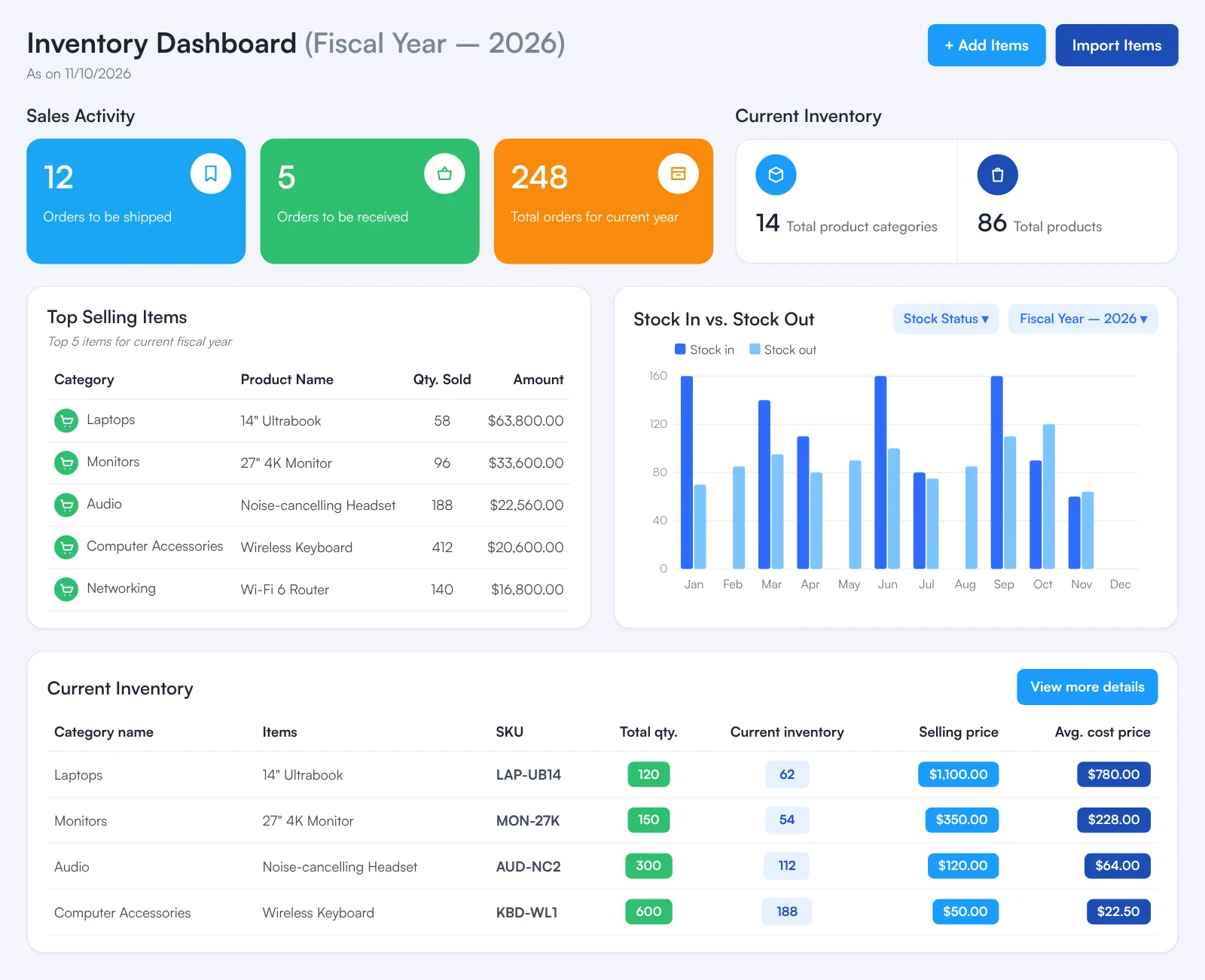
Inventory Dashboard
Orders to be shipped, orders to be received, total orders, your five top-selling items, a monthly Stock In vs. Stock Out chart, and a table of every product with quantities and prices.
Add or import products
Add a product with its category, SKU, description, units on hand and cost price (the opening balance is calculated), or import many from an Excel file in the QuickBooks® item list layout.
Re-stock thresholds
Set a re-stock threshold per product; when Current Inventory runs down to it, the cell turns red so you can see what to re-order.
Stock by purchase and adjustments
See which vendor bill each unit on hand came from, and reduce stock with Shrink Inventory (lost, damaged, stolen, expired) or Advertising (samples, displays, giveaways) at that purchase's unit cost.
Sales orders and returns
Every customer invoice with products appears as a sales order with shipping and payment status. Record a Normal Return (back into stock) or a Damaged Return (expensed); the customer is credited automatically.
Receive vendor orders
Every vendor bill with products appears as a vendor order; Receive Inventory with the arrival date adds the products to stock and clears them from Pending (Yet to be received).
Inventory Value Report
Total and available stock per product as quantities and dollar values at average unit cost, for any period you choose, with export to Excel.
Item Stock History
Every movement behind a product's quantity — Opening Entry, Purchased, Sold, Normal Return — with the customer or vendor and invoice number.
How it works
How it works in fiscal50
Add your products
On Inventory › Dashboard click + Add Items and enter Category, SKU, Description, the Unit on hand, Cost Price and Sales price/rate — or use Import Items with the QuickBooks® sample file layout.
Buy stock with an inventory bill
Record a vendor bill with product lines (Expenses › Bills › Create Bill, Inventory selected). It appears on Inventory › Vendor Orders as Pending.
Receive the goods
When the delivery arrives, click Receive Inventory on the vendor order, set the Date it arrived and click Save; the units join Current Inventory.
Sell and ship
Invoice the customer with product lines; the sale appears on Inventory › Sales Orders. Answer Yes when fiscal50 asks whether the order has shipped.
Handle returns and value your stock
Record Normal or Damaged Returns from the order's Action menu, and use the Inventory Value Report to value stock on hand at period end.
In your books
What it posts
Stock is bought on a bill and its cost moves to Cost of Goods Sold when the items sell.
Example amounts.
| Account | Debit | Credit |
|---|---|---|
| Inventory | 2,400.00 | |
| Accounts Payable | 2,400.00 | |
| Total | 2,400.00 | 2,400.00 |
A normal return puts the goods back into Inventory and credits the customer; a damaged return credits the customer but leaves the goods’ cost as an expense.
What is the difference between Total qty. and Current inventory?
Total qty. is the total quantity added to stock. Current inventory is what you have on hand now — the total quantity minus the quantity sold.
Why is a product's Current Inventory shown in red?
Its stock has run down to its re-stock threshold. It is time to re-order.
What happens when I receive a vendor order?
Its status changes to Received and its products are added to your Current Inventory. Use the date the goods actually arrived.
What is the difference between a Normal Return and a Damaged Return?
A Normal Return is for goods that can be sold again — they go back into your inventory. A Damaged Return is for goods that can't be sold again — they are treated as an expense instead.
How is the customer credited for a return?
If the invoice is already paid, a credit is applied to the customer. If it isn't paid yet, a credit note is issued and applied to the original invoice amount.
How is the inventory value calculated?
The quantity multiplied by the Average Unit Cost — never the Sales Price.
Related
Works well with
Bills and expenses
Vendor bills, emailed receipts, scheduled bills and vendor payments.
Read moreInvoicing
Invoices, recurring schedules, retainers, deferred income and customer payments.
Read moreFinancial reports
Balance sheet, P&L, cash flow, trial balance, ledgers and drill-down.
Read moreVendor and payee management
Vendors and payees in one place: dashboards, advances and 1099 tracking.
Read moreMake this the last month you do bookkeeping by hand.
Start free. Connect a bank. Watch the agents go to work.