
AI bookkeeping software you can actually audit
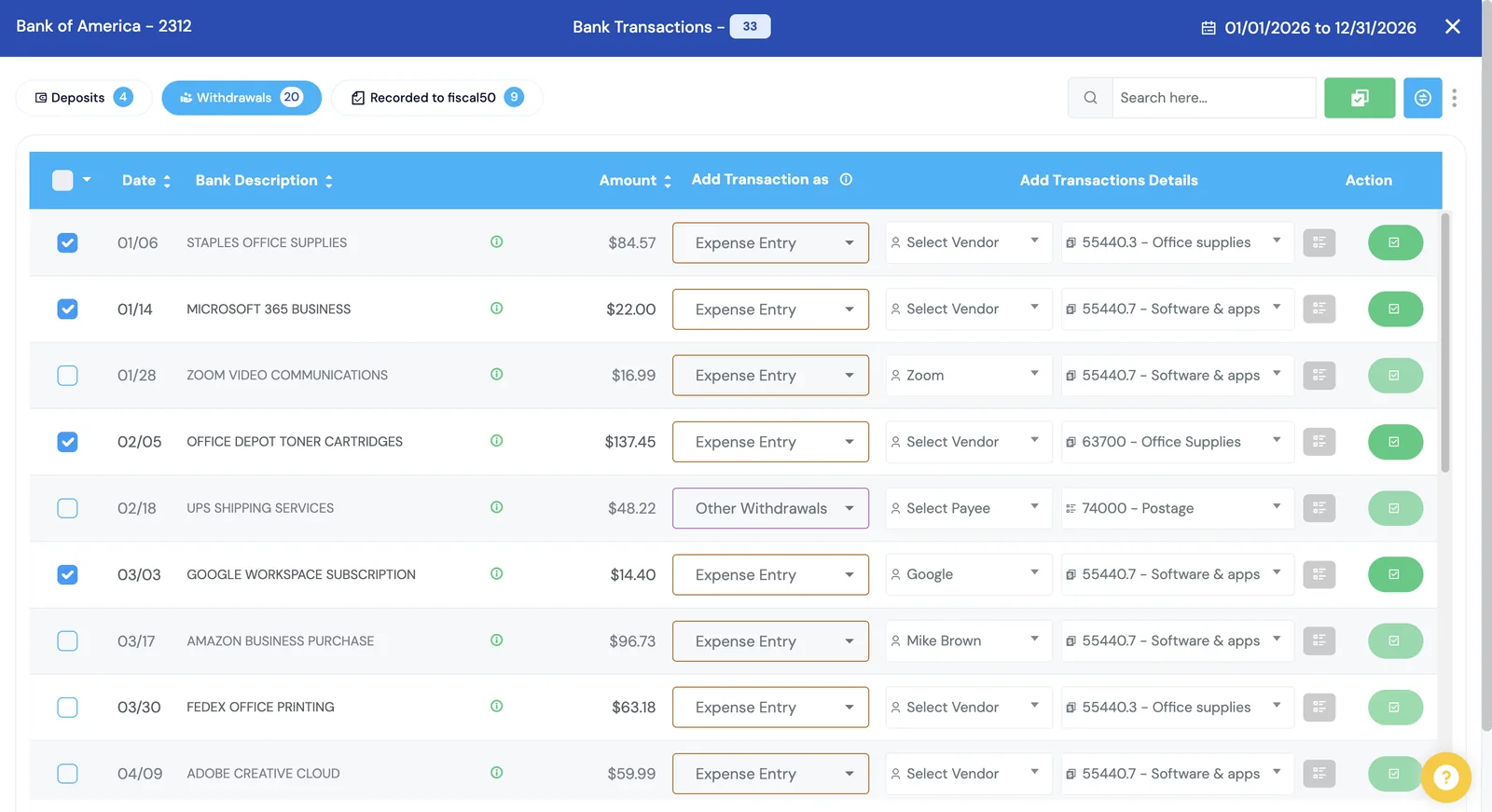
Most AI bookkeeping tools ask you to trust a black box. fiscal50 posts entries with a reason attached. Each bank or card transaction gets a recommended category, account and contact, a confidence level and a short explanation. Confident matches post as balanced double-entry journal entries; the rest wait for your one-click review.
See it work
From bank feed to balanced books, in a few clicks
Transactions sync, the AI recommends how to book each one with a reason, and when you post, a balanced journal entry is recorded.
 Banks to Books
Why it matters
Where the AI does the work
AI is used where bookkeeping is repetitive and pattern-based, and stays visible when it acts.
Categorization
Category, account, vendor or customer for every transaction, learned from how your books were kept before.
Matching
Deposits matched to open invoices and withdrawals to bills, comparing the transaction’s date, description and amount.
Auto-reconciliation
Ending balances predicted and checked against the bank, then each month reconciled in turn until something needs you.
Answers and tasks
Fifty answers how-to questions, reads figures from your books and creates invoices, bills and payments from the chat after you confirm.
In practice
Where you stay in charge
Automation should save time without hiding decisions.
You post
Recommendations are pre-selected, but nothing reaches your books until you post it.
Readable explanations
Every recommendation shows its reason, a confidence score and the evidence behind it.
Reversible
Send any posted entry back to pending, edit it or reclassify in bulk.
Locked periods
Closed months cannot change, so reported numbers stay reported.
For bookkeepers
How does a bookkeeper review AI recommendations for each client?
The AI prepares each entry; the bookkeeper decides. The review happens inside each client’s own fiscal50 books, one transaction at a time or in bulk.
How Banks to Books recommends
Each bank or card transaction arrives with a pre-selected recommendation: the category or account, the vendor or customer, a reason, a confidence percentage and the evidence behind it.
How you review each entry
Accept the recommendation or change it, then click Post. A posted transaction is a balanced double-entry journal entry, and you can send it back to pending, edit it or reclassify it later while the month is open.
Ledger-native, not an add-on
The recommendation is made, posted and reconciled in the same books, so there is no separate app to sync and no second copy of the transaction to keep in step with the ledger.
Across every client
In the Bookkeeper Workspace, each client’s Banks to Books backlog shows on one dashboard, and rules you approve in client AI memory apply to that client only.
FAQ
Questions people ask
What is AI bookkeeping software?
AI bookkeeping software uses machine learning to categorize transactions, match payments and prepare journal entries that a bookkeeper would otherwise do by hand. fiscal50 adds a reason, a confidence level and the evidence to every recommendation, and you post it.
Is AI bookkeeping accurate?
Accuracy improves as fiscal50 learns from how you record transactions. Each recommendation shows its reason, confidence and evidence, and nothing posts until you confirm it, so mistakes are easy to spot and correct.
Does AI bookkeeping replace my accountant?
It removes data entry and routine categorization. You can keep working with an accountant or bookkeeper, who gets their own login and cleaner books to review.
How does a bookkeeper check AI-categorized transactions?
In Banks to Books each transaction shows the recommended account and contact with a reason, a confidence percentage and the evidence. The bookkeeper accepts or changes it and clicks Post. Nothing reaches the books until then, and posted entries can be sent back to pending while the month is open.
What is the difference between ledger-native AI and an AI add-on?
Ledger-native AI works inside the accounting software: in fiscal50 the recommendation is made in Banks to Books, posted as a journal entry and reconciled in the same books. An add-on is a separate app that categorizes transactions and sends the results to the accounting software through an integration.
Related
Go deeper
Banks to Books
AI recommends how to book every bank and card transaction and shows why.
Read moreBank reconciliation
Auto-reconciliation that predicts each ending balance and reconciles every account month after month.
Read moreFor bookkeepers and firms
The Bookkeeper Workspace: every client in one login, month-end for every client on one board, client portal, CRM and billing. Connect is free.
Read moreOnline bookkeeping that works wherever you do
fiscal50 is cloud bookkeeping software you can use from any browser: bank feeds, invoices, bills, inventory, reports and a virtual accountant, with access for your bookkeeper.
Read moreMake this the last month you do bookkeeping by hand.
Start free. Connect a bank. Watch the agents go to work.